Detection engines

Eight detection engines. One clear picture.

SectraTEK is the Mobile threat detection and intelligence platform.

Eight engines read the evidence you give them. Each one gives you a result you can explain, and a clear way to read it. Every count has its date.

about 648,000Threat indicatorsin SectraTEK Intelligence, as of October 6, 2026
976Family labelsin SectraTEK Intelligence
8Detection engineseach with a clear way to read its result

Counts are as of October 6, 2026 (the shipping build). About these figures.

The corpus

What SectraTEK compares your evidence with.

SectraTEK compares evidence with about 648,000 threat indicators from SectraTEK Intelligence, our curated corpus, built by SectraTEK Research.

Every indicator keeps its malware family and its campaign, so a match arrives with context. A match shows the family and the campaign it belongs to, so you can see what was found and how much weight it deserves.

Indicators come from SectraTEK Research, brought together in SectraTEK Intelligence.

What SectraTEK Intelligence covers

Commercial and state-grade spyware

5,288
indicators

Spyware: 5,288 indicators covering commercial and state-grade spyware.

Exploit kits

258
indicators

Exploit kits: 258 indicators covering iOS exploit kits.

Stalkerware

6,073
indicators

Stalkerware: 6,073 indicators covering consumer monitoring apps.

SectraTEK Intelligence

636,491
indicators, 976 family labels

SectraTEK Intelligence is our own curated store: 636,491 indicators, merged, de-duplicated and rated by SectraTEK Research, built on October 6, 2026.

Network and traffic intelligence

about 268,000
network indicators

Every traffic capture is checked against about 268,000 network indicators.

Vulnerability intelligence

8,043
unique CVEs, with known-exploitation context

Vulnerability intelligence holds 8,043 unique CVEs with known-exploitation context, so every device is checked against vendor security releases.

SectraTEK Intelligence by indicator type

The 636,491 indicators in SectraTEK Intelligence break down by type as shown; the bars are drawn to scale. Counts are unique indicators by type.

  • File hashes, SHA-256152,842
  • Domains149,227
  • File hashes, MD5125,845
  • App and package identifiers82,014
  • URLs70,201
  • IP address and port endpoints39,765
  • File hashes, SHA-115,999
  • IPv4 addresses542
  • App Store item IDs55
  • Signing certificates1
View as a table
SectraTEK Intelligence by indicator type
TypeIndicatorsShare
File hashes, SHA-256152,84224.01%
Domains149,22723.45%
File hashes, MD5125,84519.77%
App and package identifiers82,01412.89%
URLs70,20111.03%
IP address and port endpoints39,7656.25%
File hashes, SHA-115,9992.51%
IPv4 addresses5420.09%
App Store item IDs550.01%
Signing certificates10.00%
All types636,491100%
The engines

Eight engines. One clear way to read each result.

Choose an engine to see what it examines, what evidence it works on, what you get, a real screen from a demonstration case and how to read the result.

Threat intelligence

Exact matching against the corpus

What it examines

Compares what the evidence contains, such as apps, certificates, files, domains and addresses, with SectraTEK Intelligence, and reports every exact match.

Evidence it works on
  • iOS backup
  • iOS full filesystem
  • iOS sysdiagnose
  • Android bug report
  • Advanced Android acquisition
  • Android full filesystem
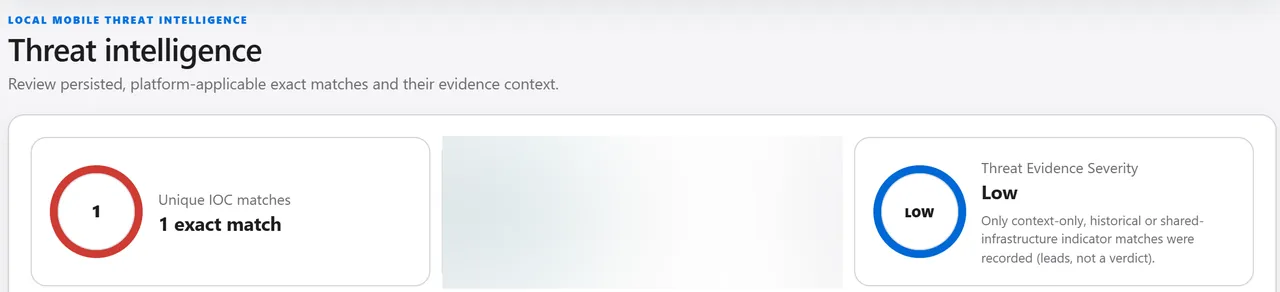
The Threat intelligence screen of a demonstration case: one exact match beside a threat evidence severity of Low, with the reminder that matches are leads, not a verdict. The coverage figures are blurred.
Demonstration case. In the demonstration case, 646,426 unique indicators applied and one exact match was recorded, rated Low. Open full size of the Threat intelligence screen

What you get

  • Every result carries a clear severity, so the strongest evidence is at the top of your review.
  • Strong, specific matches rise to High or Critical, so you know where to start.
  • An indicator is counted once and keeps its full context, so your totals stay clean.
  • Context-only matches are rated low and labeled, so they inform your review without distracting from the evidence that matters.

Reading this result

  • A result with no match is reported with the coverage behind it, so you can state exactly what was compared.
  • Every match arrives with its family and context, so you can check it against the evidence and confirm it with confidence.
  • Severity ranks how directly the evidence matches known indicators. If a comparison cannot complete, SectraTEK tells you rather than show a partial result.

On SectraTEK Lite the overview shows the count of unique matches, the indicators compared and an overall rating. Every match travels in the complete AI dossier.

Findings

Applications and settings that warrant review

What it examines

Reviews the apps and settings that deserve attention on the device and combines the signals into findings you can act on.

Evidence it works on
  • Android full filesystem
  • iOS full filesystem
  • iOS backup
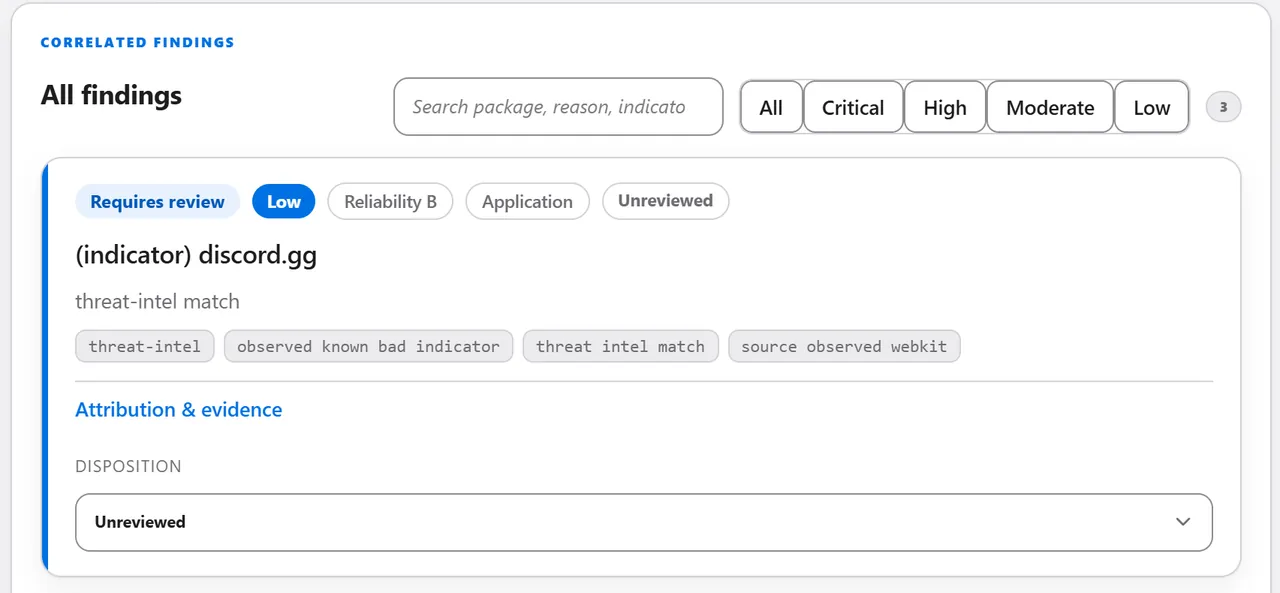
The Findings list of a demonstration case: the first finding, rated Low with reliability B and marked Requires review, with the matched indicator and the disposition an examiner sets, still Unreviewed.
Demonstration case. In the demonstration case, three findings were raised, all rated Low and Requires review, and none had been reviewed by an examiner. Open full size of the Findings screen

What you get

  • Findings stay focused: ordinary activity is not raised, and what is raised comes with its reasons.
  • Each finding carries a classification and the reasons behind it, so you can see why it was raised.
  • The examiner confirms, rejects, marks as needing corroboration or marks as likely benign. That decision is kept when the case is examined again.

Reading this result

  • A finding points you to what deserves review. SectraTEK lists the reasons behind every classification, so you can confirm the conclusion yourself.
  • Embedded addresses are reported as what an app is able to do, and matches are made against the intelligence installed on your workstation.
  • Findings focus on the software people install and configure, which keeps the list on what matters. Where an iOS backup holds less than a full file system, SectraTEK marks the checks it could not evaluate.

SectraTEK Lite summarizes findings in the overview. Every finding, with its classification and reasons, travels in the complete AI dossier. Record-level review is part of SectraTEK Full.

Insight

Leads for you to review

What it examines

Turns raw device activity into leads you can review, by looking for activity that does not fit the apps and identities the device records.

Evidence it works on
  • iOS full filesystem
  • Android full filesystem
  • iOS backup
  • iOS sysdiagnose
  • Android bug report
  • Advanced Android acquisition
  • Mobile traffic capture
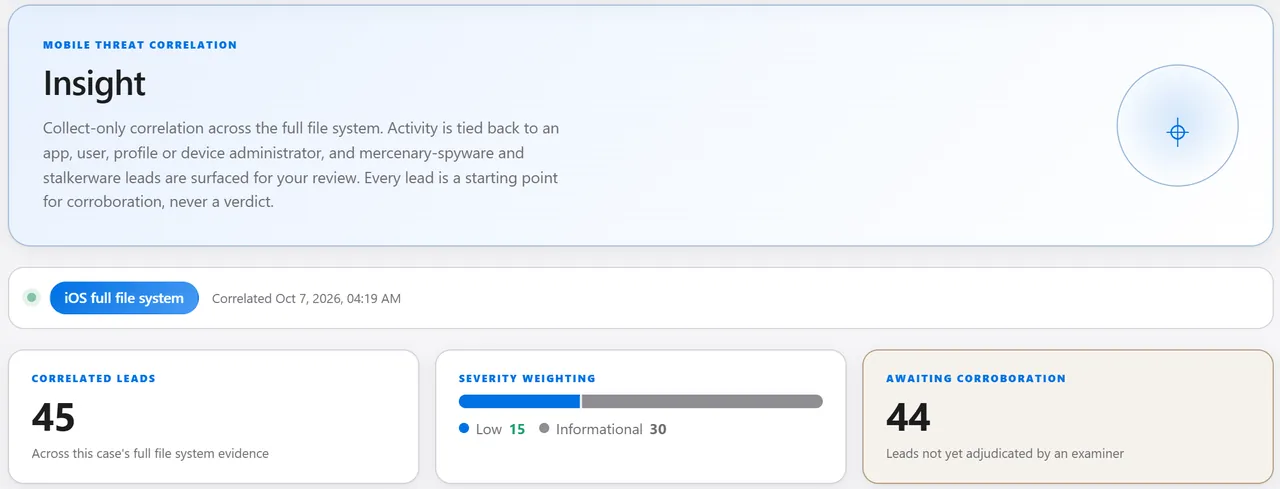
The Insight screen of a demonstration case: 45 correlated leads, 15 Low and 30 Informational, and 44 awaiting corroboration by an examiner.
Demonstration case. In the demonstration case, Insight surfaced 45 leads, 15 rated Low and 30 Informational, and 44 of them awaited corroboration. Open full size of the Insight screen

What you get

  • Leads are ranked so the strongest come first, and each carries the identifiers and source paths behind it.
  • Each check reports whether it had the evidence to run, so you know exactly what was covered.

Reading this result

  • A lead is a reason to look closer. SectraTEK ranks leads and shows the evidence behind each one, so you decide what it means.
  • Log-based checks report the period the device retained, so you can state exactly which dates the evidence covers.

On SectraTEK Lite the overview shows an Insight card with the number of leads, a count for each severity and the strongest few titles. Every lead travels in the complete AI dossier.

Permission and access correlation

Which apps can reach which capabilities

What it examines

Brings each app together with the sensitive capabilities it can reach, on iOS and Android, and shows how the app was installed.

Evidence it works on
  • iOS backup
  • iOS full filesystem
  • iOS sysdiagnose
  • Android bug report
  • Advanced Android acquisition
  • Android full filesystem
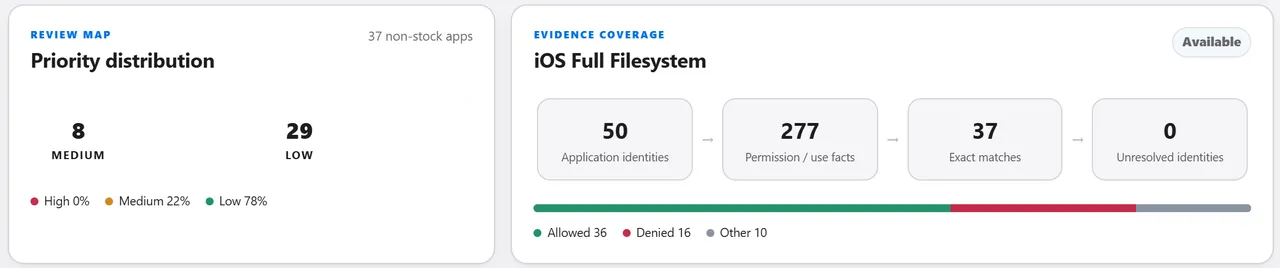
The permission correlation overview of a demonstration case: the priority distribution of 37 non-stock apps, 29 Low and 8 Medium, and the evidence coverage from 50 application identities to 277 permission records and 37 exact matches.
Demonstration case. In the demonstration case, permission correlation covered 37 non-stock apps, 29 at Low priority and 8 at Medium, with none at High, from 277 permission records. Open full size of the Permission and access correlation screen

What you get

  • Each app gets a Low, Medium or High review priority that tells you where to look first.
  • Priority follows the access an app can reach, never its name or popularity.
  • Every permission record is tied to its app, so each app's access is shown as the evidence recorded it.

Reading this result

  • Priority tells you where to look first, and sits beside the threat-intelligence result so you can read both side by side.
  • Each permission is shown with its recorded state, so you can tell what an app was able to reach and decide whether it used it.
  • Permission correlation runs on device evidence that records both app identity and permissions, and tells you plainly when a source is not present.

In SectraTEK Lite, each app, its recorded access, how it was installed and its review priority travel in the complete AI dossier.

Mobile traffic analysis

Reads the metadata, never the content

What it examines

Examines a preserved, hash-verified network capture and reconstructs the network activity, then assesses destinations, check-in rhythm, encrypted-connection fingerprints and indicator matches. It reads metadata and never decrypts content.

Evidence it works on
  • Mobile traffic capture
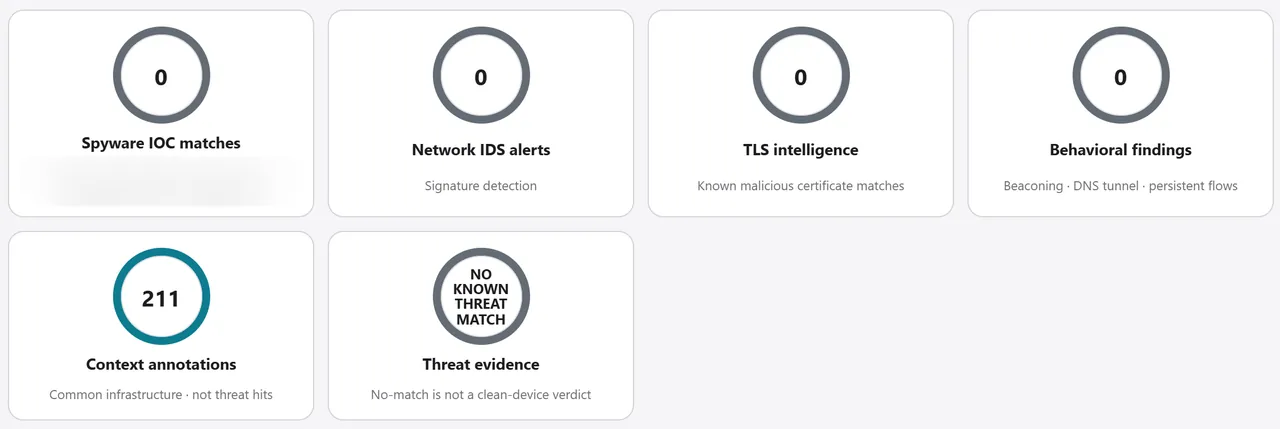
The Captured Traffic Analysis summary of a demonstration case: no spyware match, no network alert, no certificate match and no behavioral finding, and 211 context annotations of common infrastructure. One line of figures is blurred.
Demonstration case. In the demonstration traffic case, no known threat match was found, and 211 informational context annotations were recorded. Open full size of the Mobile traffic analysis screen

What you get

  • Check-in regularity and destination risk come together in one session assessment, from informational to critical, with the findings behind it.
  • Network alerts and behavioral findings are rated so the most important ones surface first.
  • The network threat result reads No known threat match when nothing qualifies, and shows the coverage behind it.

Reading this result

  • SectraTEK reads encrypted traffic for who, when, how regularly, how much and what software, the metadata that answers most questions, without decrypting content.
  • Interception checks report how many encrypted handshakes could be checked, so coverage is part of the result, and longer captures give a fuller picture of behavior.
  • Regular check-in rhythm is highlighted so you can review it first, and SectraTEK never attributes a connection to an app without supporting evidence.
  • Traffic analysis uses the intelligence installed on your workstation and never contacts an outside source during an examination.

On SectraTEK Lite a traffic examination's overview shows capture status, sessions, network records and the threat-intelligence ring. Destinations and findings travel in the complete AI dossier.

Vulnerability exposure

What the vendor bulletins say about this exact device

What it examines

Compares the device's operating system and installed app versions, recovered from the evidence, with vendor security releases and known-exploitation context.

Evidence it works on

  • iOS backup
  • iOS full filesystem
  • iOS sysdiagnose
  • Android bug report
  • Advanced Android acquisition
  • Android full filesystem
A demonstration case's security hardening score of 75 percent with 62 percent evidence coverage, beside a Vulnerability exposure rating of Critical.
Demonstration case. In the demonstration case, Technical Exposure was rated Critical beside a security hardening score of 75 percent with 62 percent evidence coverage. Open full size of the Vulnerability exposure screen

What you get

  • Technical exposure rates the device by the most severe vulnerability that applies to it.
  • Each result is clearly classified, and anything that cannot be decided is reported as such, never as clean.
  • Known exploitation is shown as its own field, so you can separate exposure from exploitation.

Reading this result

  • Affected tells you the software falls inside a vulnerability's published scope, and known exploitation is shown separately, so you can state exposure precisely.
  • Device identity comes from the evidence itself, so exposure is assessed on device evidence. Where the evidence holds little version detail, the result says so.

On SectraTEK Lite the overview card shows the headline technical exposure, the affected and unresolved counts and known-exploited counts. The affected items with installed and fixed versions travel in the complete AI dossier.

Security posture

How the device is configured

What it examines

Reconstructs the device's recoverable security and privacy configuration: screen lock, updates, developer and debugging options, privacy settings and installed configuration profiles. Only settings the evidence establishes are assessed.

Evidence it works on
  • iOS full filesystem
  • Android full filesystem
  • Android bug report
  • Advanced Android acquisition
  • iOS backup
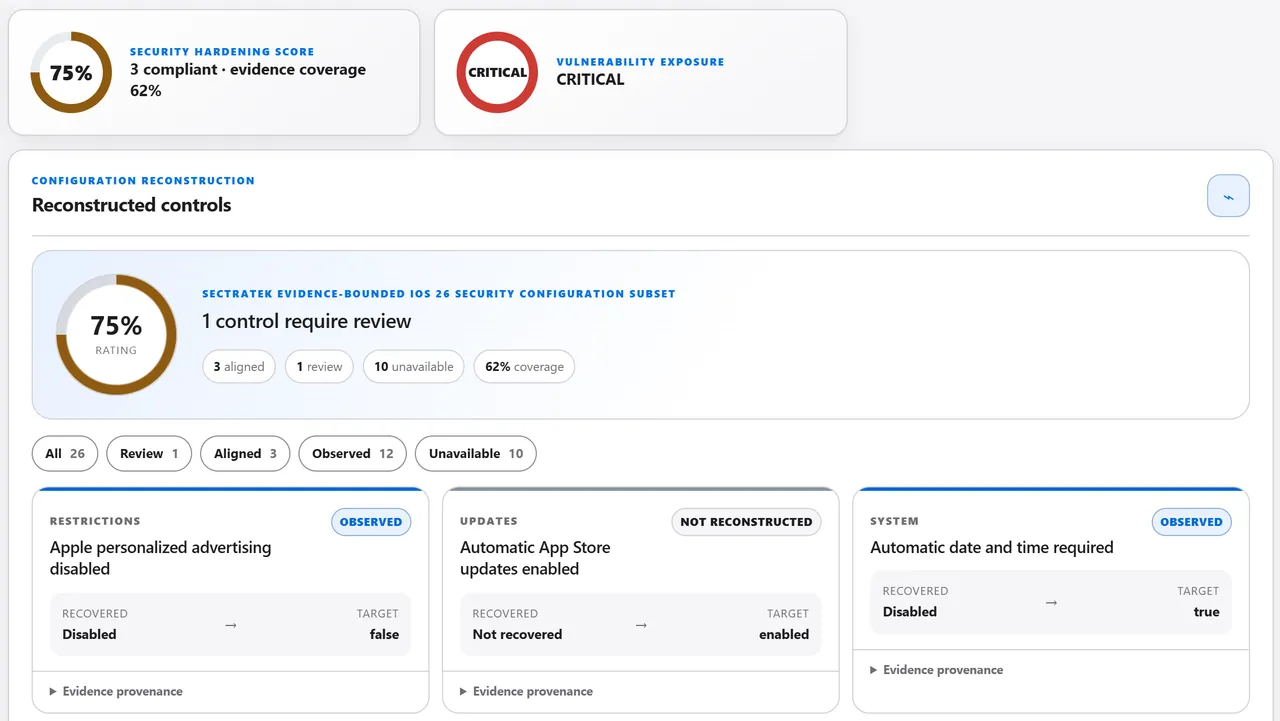
The reconstructed controls of a demonstration case: a 75 percent rating, three controls aligned, one to review, ten unavailable and 62 percent coverage, with individual controls such as automatic date and time and advertising settings.
Demonstration case. In the demonstration case, 3 controls were aligned, 1 needed review and 10 could not be reconstructed, with 62 percent coverage. Open full size of the Security posture screen

What you get

  • Each control is reported with a clear status, and controls the evidence cannot establish are left out of the score.
  • The configuration score and evidence coverage are read together, so you see how the device is set up and how much of it the evidence covers.
  • For iOS, Lockdown Mode, backup encryption and the number of trusted computers are reported as posture facts beside the score.

Reading this result

  • Security posture shows how the device is configured, beside the threat-intelligence result. A setting to review is a hardening recommendation.
  • Scores cover the settings a device image establishes, and evidence coverage is shown beside them so the basis is always clear.

On SectraTEK Lite the overview shows a Device posture card: Lockdown Mode, backup encryption, trusted computers, the security configuration score with its coverage and the number of settings to review. Each setting travels in the complete AI dossier.

OSINT identifier checks

Runs when you start it

What it examines

Checks whether the device owner's own identifiers, such as the set-up account, configured accounts, saved logins and the device's phone number, have accounts on public platforms, and whether an email address appears in known data breaches. Account presence and breach exposure are always reported separately.

Evidence it works on
  • iOS backup
  • iOS full filesystem
  • Android full filesystem
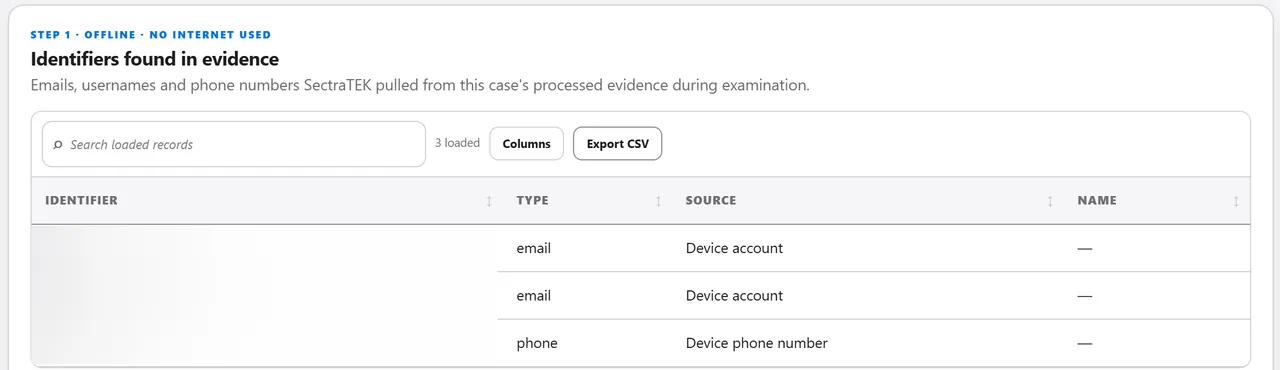
The OSINT Findings screen of a demonstration case: step one, identifiers found in the evidence, listing two device account emails and a device phone number, all blurred.
Demonstration case. In the demonstration case, the OSINT screen listed two device account emails and a device phone number found offline, and no live check had been run. Open full size of the OSINT identifier checks screen

What you get

  • Results show their confidence, so you can see how much weight each one deserves.
  • Finding identifiers in the evidence works without the Internet. Checking them happens only when you choose Run checks, never during case processing.

Reading this result

  • OSINT checks run when you start them, and SectraTEK confirms an Internet connection first, so a missed connection is never mistaken for a negative result.
  • Results arrive as leads to corroborate, with their confidence shown.
  • OSINT is built for the device owner's own identifiers in an authorized examination.

SectraTEK Lite offers Quick OSINT from Home. Identifiers recovered from the evidence travel in the complete AI dossier.

How grading works

Ratings you can read at a glance. The examiner decides.

SectraTEK reports what it compared and what matched, and the examiner draws the conclusion.

The severity ladder

  • Critical

    The strongest evidence, where you start.

  • High

    Strong evidence worth immediate review.

  • Moderate

    A signal worth a second look.

  • Low

    Context or ordinary activity, noted for completeness.

  • No match

    A neutral result, shown with the coverage behind it.

Examiner review

  • Every lead is marked for corroboration, and the conclusion stays with the examiner.
  • A finding records the examiner's decision: confirmed, rejected, needs corroboration or likely benign.
  • Results show their coverage. A check that could not run says so, so a gap is never mistaken for a clean result.
Updates and local operation

Examinations stay on your workstation. Intelligence stays current on your schedule.

  • An examination makes no outside contact, which keeps results reproducible.
  • Intelligence stays current through updates you control. If an update cannot be applied, your previous intelligence stays active.
  • Completed results are never rewritten by an update. You can re-check a case against newer intelligence, and the earlier result is kept.
SectraTEK Full and Lite

The same engines. The workspace is the difference.

Both editions run the same detection engines on the same intelligence. They differ in the workspace around the results: Lite keeps the results, Full keeps the case.

How SectraTEK Lite and SectraTEK Full present the result of each engine
EngineSectraTEK Lite: included in the report and overviewSectraTEK Full: full workspace
Threat intelligenceOverview ring, card and rating; every match in the AI dossierThreat intelligence workspace: matches, coverage and the SectraTEK Intelligence panel
FindingsFindings summarized in the overview; every finding in the AI dossierFindings workspace with filters and examiner review
InsightInsight card in the overview; every lead in the AI dossierInsight workspace with leads and check coverage
Permission correlationIncluded in the report and overview; every app in the AI dossierWorkspace with priority distribution and per-app cards
Mobile trafficTraffic card and session summary in the overview; details in the AI dossierMobile Traffic, Insight and Analyzed Data workspaces
Vulnerability exposureOverview card; details in the AI dossierWorkspace with the vulnerability table and remediation target
Security postureDevice posture card; every setting in the AI dossierWorkspace with every reconstructed control
OSINTQuick OSINTCase OSINT page and Quick OSINT

The complete AI dossier is built from the same verified results in both editions, ready for the AI tool or analyst you choose.

Compare the editions

Quality

How we keep results precise.

Grading is tuned against public research and checked against demonstration cases. This section says how.

  • In October 2026 we reviewed every lead, finding, permission row, match and traffic finding in four demonstration cases (iOS full filesystem, Android full filesystem, iOS sysdiagnose and mobile traffic) against public sources.
  • The review led to 36 grading refinements, each with a test that the riskier variant still raises an alert.
  • A written ground-truth protocol, with controlled test devices and independent truth channels, guides ongoing validation.
About the figures

About these figures.

Counts on this page were measured on October 9, 2026 from the intelligence shipped with SectraTEK build 1.0.0.

  • Product screens read the intelligence installed on each computer, so counts in the app follow your last update.
  • Screenshots are of demonstration cases on test devices. Identifiers are blurred and every image was checked at full zoom before use.

See it on your own cases.

Schedule a demo, or request a quote. Your SectraTEK contact takes care of the rest, including payment.

Read the Cookie Statement