Choose your evidence
SectraTEK reads iOS file system extractions, Android file system extractions and device backups, and it analyzes captures of mobile network traffic.
 SectraTEKby Prudential Associates
Choose the workflow that matches your evidence, run the examination and read graded findings with their reasons. Then release the AI-Dossier and deliver a report you can explain.
Every examination follows the same path, so a new examiner knows what comes next and a reviewer knows what to expect.
SectraTEK reads iOS file system extractions, Android file system extractions and device backups, and it analyzes captures of mobile network traffic.
A short guided intake records the case, the evidence and the examiner once, before processing begins, and shows a review step before you run the examination.
Evidence is referenced where it is stored. SectraTEK opens it read-only and does not copy it into the product; if the source changed after it was added, the examination is refused.
A SHA-256 hash of the evidence is recorded in the case before analysis starts, and a final check near the end confirms the evidence still matches.
SectraTEK has eight detection engines, and both editions run all of them; SectraTEK Full adds a workspace for each engine, while SectraTEK Lite shows each engine’s result in the overview and carries the details in the dossier.
Processing carries on in the background, and completed results are there when you reopen the case, including after SectraTEK restarts.
In SectraTEK Full you build the report from the case itself: choose the sections to include, add the case information and a title, and export it.
The AI-Dossier carries the whole examination to the AI tool you choose: the findings with the examiner’s dispositions, Insight leads, threat intelligence matches, exposure and security configuration results, permission correlation, the processing record and the evidence integrity history.
The Analyzed data screen sorts what was recovered into categories with counts. The number of categories belongs to the demonstration case.
The examiner confirms or rejects each finding. A decision applies to the result it was made on; if the result changes the decision is shown as superseded.
Insight leads are starting points for corroboration, never verdicts. Leads are ranked so the strongest come first; the examiner decides.
No findings means no known indicators were found in the evidence provided.
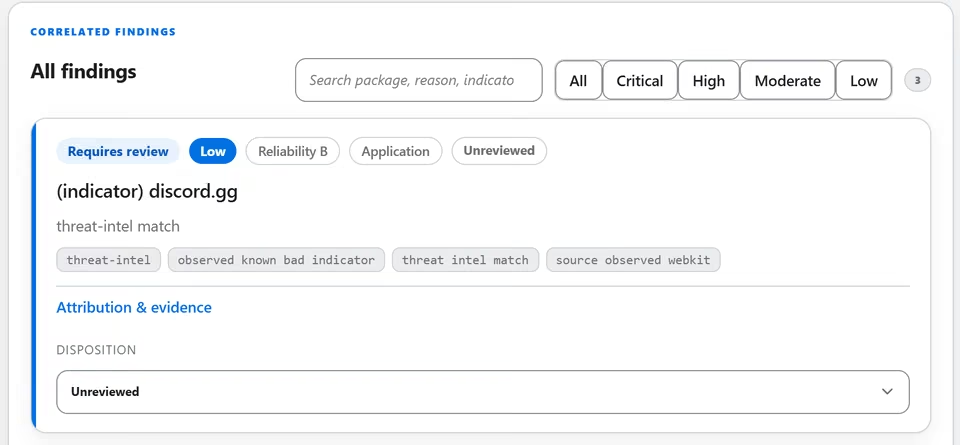
The complete AI dossier is built from the same verified results in both editions, ready for the AI tool or analyst you choose.
The AI-Dossier is built as a draft and cannot be downloaded until an examiner approves it; the approval is recorded in the case audit trail (SectraTEK Full). In SectraTEK Lite the operator releases the dossier and the release is recorded.
SectraTEK Full and SectraTEK Lite run the same detection engines on the same intelligence and deliver the same verified results; the difference is the workspace around them.
Lite keeps the results. Full keeps the case.
Every picture is a screenshot of the running application on a demonstration case, with identifiers blurred. Nothing here is a customer result.
Schedule a demo, or request a quote. Your SectraTEK contact takes care of the rest, including payment.